MCP, short for Model Context Protocol, is an open standard that lets AI assistants work with other apps. Instead of only answering questions, an assistant like Claude can look things up and take actions in the tools you already use: read a document, create a calendar event or, with Pidgo, set up an Instagram comment-to-DM automation.
If you've heard people say "connect Claude to X" or "add an MCP server", this is what they mean. This guide explains MCP without the jargon, so you can decide whether it's useful for your work.
The short version
- What it is: a common language between AI assistants and apps, published as an open standard.
- Who made it: Anthropic, the company behind Claude, introduced it in November 2024. Since then OpenAI, Google, Microsoft and many others have adopted it.
- What it does: lets an assistant see what an app offers ("tools") and use them when you ask.
- Why it matters: you describe what you want in words, and the assistant does the clicking.
- Who stays in control: you. The app decides what the assistant may do, and good apps keep risky steps for you.
Why MCP exists
AI assistants are good at understanding what you mean and at writing. On their own, though, they're stuck inside the chat window. They can tell you how to set up an automation, but they can't set it up.
Before MCP, every app that wanted to work with an AI assistant had to build a separate integration for each assistant. That's slow and expensive, so most apps didn't. MCP fixes this with one shared standard: an app builds one MCP server, and every assistant that speaks MCP can use it. It's often compared to USB-C: one plug that fits many devices.

How MCP works
There are three parts:
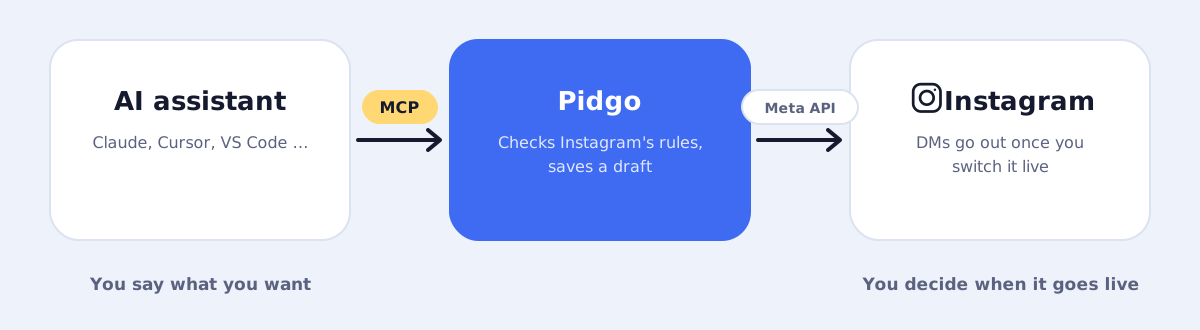
- The MCP client: your AI assistant, for example Claude, Cursor or VS Code.
- The MCP server: the app's connection point. Pidgo's lives at
https://pidgo.app/api/mcp. - The tools: the actions the server offers, each with a clear description. Pidgo offers tools like "list posts" and "create automation".
When you connect an assistant to a server, it asks the server which tools exist. Later, when you write "set up an automation for my latest reel", the assistant recognizes that a Pidgo tool fits, fills in the details from your request and calls it. The server checks the request, does the work and sends back the result, which the assistant explains to you.
What a tool looks like
A tool is a named action with a description and a list of inputs. Pidgo's "create automation" tool, for example, takes a trigger (one post, any post or your next post), keywords, an optional public reply, an opening message with a button, the link message and optional extras like a follow gate or a reminder. The description tells the assistant what each field means and what Instagram's limits are, so it can fill them in correctly.
What MCP means for Instagram automation
Building a comment-to-DM automation is mostly about decisions and words: which post, which keyword, what to say. That's exactly where AI assistants shine. With MCP you can:
- Describe instead of configure: "Whoever comments GUIDE gets my free guide" becomes a complete automation.
- Get better messages: the assistant writes DMs that are short, friendly and within Instagram's limits.
- Work across tools: ask your assistant to read your newsletter draft and set up a matching automation for your new reel in one go.
- Manage many accounts: agencies can describe what each client needs instead of building each flow by hand.
The step-by-step setup is in Set up Instagram DM automations with Claude.
Is MCP safe?
MCP itself is a protocol, so safety depends on how each server is built. Three things to look for:
- Narrow access: the server should only offer what's needed. Pidgo's MCP tools can read your posts and automations and create, edit or pause automations. They can't read private DMs or your Instagram password.
- Your own access: it should be tied to your account and easy to end. With Pidgo you sign in from the assistant (or use a personal access key), and you can disconnect each assistant in Pidgo's settings.
- Human approval for risky steps: anything with real-world effects should need you. In Pidgo, automations from an assistant are always drafts; only you can switch them live.
Also only connect servers you trust, the same way you'd only install apps you trust.
MCP vs. a normal API
Apps have offered APIs for a long time. The difference is who uses them. A normal API is built for developers who write code against it. An MCP server is built for AI assistants: every tool has a description in plain language, and the assistant figures out when and how to use it. You don't write code; you write a sentence.
Questions people ask
Do I need to be technical to use MCP?
Not really. In most assistants you paste the server address once and sign in, like connecting any other app. The MCP clients guide shows where to paste it in each one.
Which AI assistants support MCP?
Claude (Claude Code, Claude Desktop and claude.ai), ChatGPT, Cursor, VS Code with GitHub Copilot, Windsurf, Gemini CLI and many more. How you add a server differs per assistant; see which AI assistants support MCP.
Is MCP only for Claude?
No. Anthropic created it, but it's an open standard used by many companies and assistants.
What's an MCP server?
The connection point an app offers so AI assistants can use it. It lists the app's tools and carries out the actions.
Can an AI assistant do things I didn't ask for?
It only acts on your requests and only with the tools a server offers. Many assistants also ask for your approval before using a tool. With Pidgo, nothing reaches your followers until you switch an automation live yourself.